
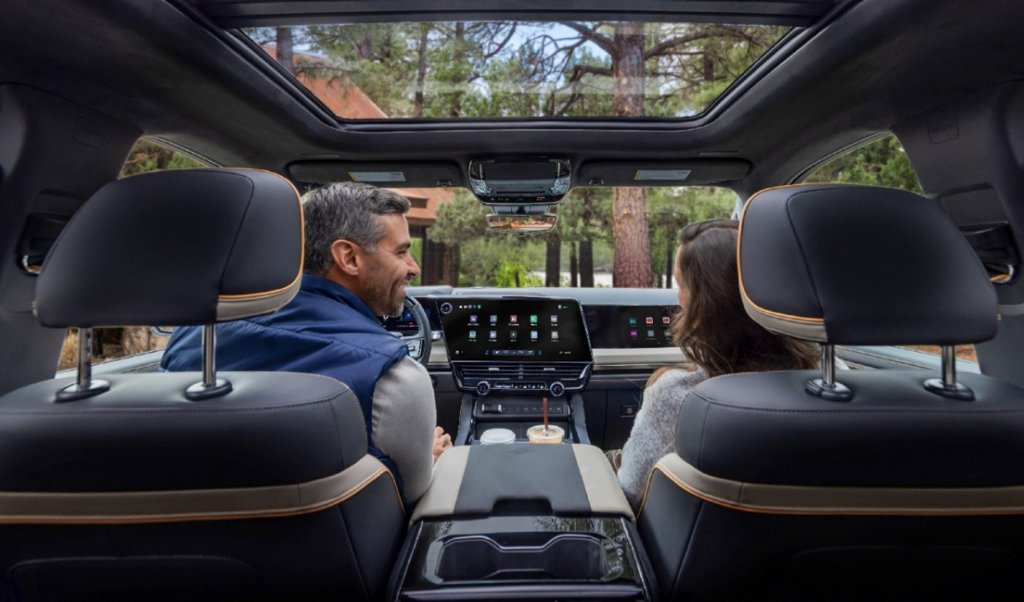
Modern driving experiences are shaped as much by voice, touch, and digital interactions as they are by steering wheels and pedals. Today, General Motors is introducing a new user interface designed to bring state-of-the-art graphics, intuitive layouts, and deeply integrated intelligence directly to the cabin.
The new user interface debuts first on GM’s light-duty pickup trucks — the 2027 Chevrolet Silverado and 2027 GMC Sierra — bringing high-tech digital sophistication to GM’s highest-volume vehicles before expanding across the broader portfolio. Built as a single scalable foundation across electric, gas and diesel-powered vehicles, it transforms time spent behind the wheel into an effortless, personalized journey.
Simple, clean visualization that makes driving effortless
Infotainment is a top priority for drivers, but complex menus shouldn’t get in the way. Built directly around real customer feedback, GM’s next-generation interface unifies software, hardware, and design to deliver fast access, clear information, and effortless control on every drive.
Generous, high-contrast displays: High-contrast display hardware delivers deeper blacks, richer colors, and sharper visual depth across navigation, vehicle status, and entertainment applications.
Re-imagined multi-view home screen: A redesigned home screen features a default split-view layout with a large, fully interactive map, and information, such as trailering metrics, fuel efficiency data, or media side by side. You can browse audio and manage vehicle details without ever losing sight of your navigation.
Mode-aware cluster layouts: The digital driver display offers dynamic views of the driving task at hand — such as trailering, offroad and Super Cruise — with fluid animations that stay in sync with vehicle activity.
Next-gen 3D driving visualization1: The new 3D visualization gives drivers greater confidence when available Super Cruise driver assistance technology2 is active by letting them see what the vehicle sees in real time — rendering surrounding traffic, lane markings, and road objects with crisp visual depth.
Intuitive access and minimal distraction
Streamlined hands-free activation: Driver assistance controls are streamlined for instant confidence, allowing drivers to engage Adaptive Cruise Control and Super Cruise with a single button press.
Personalized and quick-access controls: Drivers can organize the quick-access view around the apps and controls they use most often. Frequently used controls like climate, audio, and camera views remain right where customers expect them. Key vehicle settings are only one tap away through a Quick Access window, while key physical controls remain available for customers who prefer tactile feedback.
Non-Intrusive calls: To help keep driving focused, incoming calls and messages are designed to fit into the experience rather than a full-screen takeover, appearing neatly without taking over the entire screen. Once a call is accepted, a small call timer remains at the top of the display, allowing drivers to stay oriented in navigation or continue using key features on the home screen. Tapping the call timer opens the complete phone app as needed.
Updated Android Auto™3 and Apple CarPlay4: Our new UI integrates Android Auto™ and Apple CarPlay with our native system, giving customers the best of both worlds. Content appears in a large card window alongside native apps like trailering and vehicle status. Drivers can seamlessly move between the two experiences, taking advantage of the features developed specifically for their truck and their device.
Software designed for real-world truck capability
For truck owners, digital capability is measured by how effectively it solves real-world challenges on the job site, at the campsite, or on the open highway. Our software is engineered directly around the demanding tasks truck drivers perform every day.
Hands-free trailering and adaptive display: GM continues to be the only automaker to offer hands-free trailering with available Super Cruise driver assistance technology. We treat towing and trailering as an essential built-in experience. The moment you hook up a trailer, the user interface automatically adapts. Dedicated trailering visualization in the instrument cluster, plus a trailering card on the center screen, helps drivers monitor key towing metrics while providing a clear view of how the truck and trailer move together on the road.
Hitch view and terrain cameras: A specialized Hitch View camera helps drivers line up their trailer effortlessly without needing a spotter. In tougher terrain, underbody camera views help navigate hidden obstacles, while off-road performance information is accessible directly on the center screen.
Mobile trailer light checks: Through seamless vehicle and mobile app integration, drivers can perform complete trailer light checks — testing brake lights, turn signals, reverse lights, and running lights — directly from their smartphone. This eliminates the need to walk back and forth between the cabin and trailer during pre-trip safety checks.
Your favorite apps, built right in
Beyond core vehicle features, customers can enjoy access to Google Gemini, Google Maps, hundreds of apps on Google Play, and a suite of native app experiences tailored to the needs of truck owners powered by OnStar.
An expanding selection of integrated front passenger screen content gives riders their own space to stream, browse and stay entertained with Amazon Music, AMC+, DIRECTV, Disney+, Hulu, iHeartRadio, SiriusXM, Spotify Tubi, TuneIn, ViX, YouTube and YouTube Kids. Thanks to polarized screen technology, content is visible only to the passenger while the vehicle is in motion.
Because GM’s next-generation interface is built on a living, software-defined architecture, what customers experience on day one is only the beginning. Through continuous over-the-air (OTA) software updates, this in-vehicle experience will continue to evolve over time, regularly delivering new features, refined interaction models, and performance enhancements throughout the ownership lifecycle.
Google, Google Play, YouTube, Google Maps and other marks are trademarks of Google LLC.
Android Auto is a trademark of Google LLC. Compatible Android phone and compatible active data plan required.
1Safety or driver assistance features are no substitute for the driver's responsibility to operate the vehicle in a safe manner. The driver should remain attentive to traffic, surroundings and road conditions at all times. Visibility, weather, and road conditions may affect feature performance. Read the vehicle Owner's Manual for more important feature limitations and information.
2Always pay attention while driving and when using Super Cruise. Always use Super Cruise in accordance with local laws. Do not use a hand-held device. Requires active Super Cruise plan or trial. Terms apply. Visit Buick.com, Cadillac.com, Chevrolet.com, or GMC.com for compatible roads and full details.
3Vehicle user interface is a product of Google, and its terms and privacy statements apply. Requires the Android Auto app on Google Play and a compatible Android™ smartphone. Data plan rates apply. You can check which smartphones are compatible at http://g.co/androidauto/requirements. Android Auto is a trademark of Google LLC.
4Vehicle user interface is a product of Apple® and its terms and privacy statements apply. Requires compatible iPhone and data plan rates apply. Apple CarPlay is a trademark of Apple Inc. Siri®, iPhone® and Apple Music are trademarks of Apple Inc, registered in the U.S. and other countries.
Pre-production vehicle shown.
Modern driving experiences are shaped as much by voice, touch, and digital interactions as they are by steering wheels and pedals. Today, General Motors is introducing a new user interface designed to bring state-of-the-art graphics, intuitive layouts, and deeply integrated intelligence directly to the cabin.
The new user interface debuts first on GM’s light-duty pickup trucks — the 2027 Chevrolet Silverado and 2027 GMC Sierra — bringing high-tech digital sophistication to GM’s highest-volume vehicles before expanding across the broader portfolio. Built as a single scalable foundation across electric, gas and diesel-powered vehicles, it transforms time spent behind the wheel into an effortless, personalized journey.
Simple, clean visualization that makes driving effortless
Infotainment is a top priority for drivers*, but complex menus shouldn’t get in the way. Built directly around real customer feedback, GM's new interface unifies software, hardware, and design to deliver fast access, clear information, and effortless control on every drive.
Generous, high-contrast displays: High-contrast display hardware delivers deeper blacks, richer colors, and sharper visual depth across navigation, vehicle status, and entertainment applications.
Pre-production vehicle shown.
Re-imagined multi-view home screen: A redesigned home screen features a default split-view layout with a large, fully interactive map, and information, such as trailering metrics, fuel efficiency data, or media side by side. You can browse audio and manage vehicle details without ever losing sight of your navigation.
Pre-production vehicle shown.
Mode-aware cluster layouts: The digital driver display offers different views of the driving task at hand — such as trailering, offroad and Super Cruise — with fluid animations that stay in sync with vehicle activity.
Next-gen 3D driving visualization1: The new 3D visualization gives drivers greater confidence when available Super Cruise driver assistance technology2 is active by letting them see what the vehicle sees in real time — rendering surrounding traffic, lane markings, and road objects with crisp visual depth.
Intuitive access and minimal distraction
Streamlined hands-free activation: Driver assistance controls are streamlined for instant confidence, allowing drivers to engage Adaptive Cruise Control and Super Cruise with a single button press.
Personalized and quick-access controls: Drivers can organize the quick-access view around the apps and controls they use most often. Frequently used controls like climate, audio, and camera views remain right where customers expect them. Key vehicle settings are only one tap away through a Quick Access window, while key physical controls remain available for customers who prefer tactile feedback.
Non-Intrusive calls: To help keep driving focused, incoming calls and messages are designed to fit into the experience rather than take over the full screen. Once a call is accepted, a small call timer remains at the top of the display, allowing drivers to stay oriented in navigation or continue using key features on the home screen. Tapping the call timer opens the complete phone app as needed.
Updated Android Auto™3 and Apple CarPlay4: Our new UI integrates Android Auto™ and Apple CarPlay with our native system, giving customers the best of both worlds. Content appears in a large card window alongside native apps like trailering and vehicle status. Drivers can seamlessly move between the two experiences, taking advantage of the features developed specifically for their truck and their device.
Android Auto split view with native GM apps. Pre-production vehicle shown.
Apple CarPlay split view with native GM apps. Pre-production vehicle shown.
Software designed for real-world truck capability
For truck owners, digital capability is measured by how effectively it solves real-world challenges on the job site, at the campsite, or on the open highway. Our software is engineered directly around the demanding tasks truck drivers perform every day.
Pre-production vehicle shown.
Hands-free trailering and adaptive display: GM continues to be the only automaker to offer hands-free trailering with available Super Cruise driver assistance technology. We treat towing and trailering as an essential built-in experience. The moment you hook up a trailer, the user interface automatically adapts. Dedicated trailering visualization in the instrument cluster, plus a trailering card on the center screen, helps drivers monitor key towing metrics while providing a clear view of how the truck and trailer move together on the road.
Hitch view and terrain cameras: A specialized Hitch View camera helps drivers line up their trailer effortlessly without needing a spotter. In tougher terrain, underbody camera views can help navigate hidden obstacles, while off-road performance information is accessible directly on the center screen.
Pre-production vehicle shown.
Mobile trailer light checks: Through seamless vehicle and mobile app integration, drivers can perform complete trailer light checks — testing brake lights, turn signals, reverse lights, and running lights — directly from their phone. This eliminates the need to walk back and forth between the cabin and trailer during pre-trip safety checks.
Your favorite apps, built right in
Pre-production vehicle shown.
Beyond core vehicle features, customers can enjoy access to Google Gemini, Google Maps, hundreds of apps on Google Play, and a suite of native app experiences tailored to the needs of truck owners powered by OnStar.
An expanding selection of integrated front passenger screen content gives riders their own space to stream, browse and stay entertained with Amazon Music, AMC+, DIRECTV, Disney+, Hulu, iHeartRadio, SiriusXM, Tubi, TuneIn, ViX, YouTube and YouTube Kids. Thanks to polarized screen technology, content is visible only to the passenger while the vehicle is in motion.
Because GM's new interface is built on a living, software-defined architecture, what customers experience on day one is only the beginning. Through continuous over-the-air (OTA) software updates, this in-vehicle experience will continue to evolve over time, regularly delivering new features, refined interaction models, and performance enhancements throughout the ownership lifecycle.
Google, Google Play, YouTube, Google Maps and other marks are trademarks of Google LLC.
Android Auto is a trademark of Google LLC. Compatible Android phone and compatible active data plan required.
*Source: 2025 US Ipsos NVCS (Oct '24-Jun ‘25)
1Safety or driver assistance features are no substitute for the driver's responsibility to operate the vehicle in a safe manner. The driver should remain attentive to traffic, surroundings and road conditions at all times. Visibility, weather, and road conditions may affect feature performance. Read the vehicle Owner's Manual for more important feature limitations and information.
2Always pay attention while driving and when using Super Cruise. Always use Super Cruise in accordance with local laws. Do not use a hand-held device. Requires active Super Cruise plan or trial. Terms apply. Visit Buick.com, Cadillac.com, Chevrolet.com, or GMC.com for compatible roads and full details.
3Vehicle user interface is a product of Google, and its terms and privacy statements apply. Requires the Android Auto app on Google Play and a compatible Android™ smartphone. Data plan rates apply. You can check which smartphones are compatible at http://g.co/androidauto/requirements. Android Auto is a trademark of Google LLC.
4Vehicle user interface is a product of Apple® and its terms and privacy statements apply. Requires compatible iPhone and data plan rates apply. Apple CarPlay is a trademark of Apple Inc. Siri®, iPhone® and Apple Music are trademarks of Apple Inc, registered in the U.S. and other countries.